
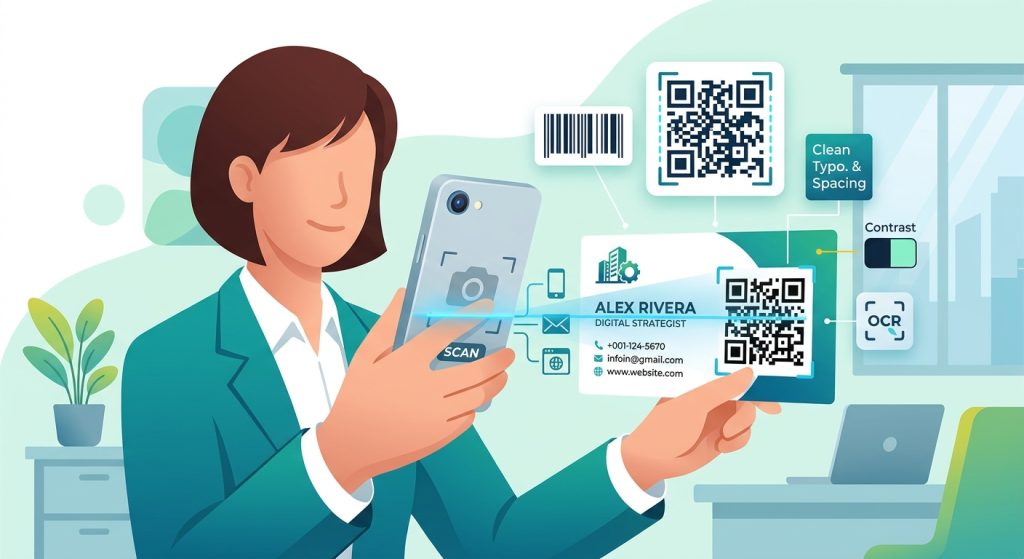
A effective business card design helps people find your contact details quickly. In the vibrant UAE market, customers meet many brands in one day. Therefore, a clean business card design communicates your identity within seconds. Modern business card design also helps digital scanners capture important details accurately.
At AL IZRA ADVERTISING GIFT TRADING L.L.C, we are your strategic partner in elevating brand visibility and communication. Based in the heart of the UAE, we transform your brand’s vision into captivating visuals through customized advertising and signage solutions.
Why Easy Scanning Matters in Business Card Design
People rarely study a card for a long time. Instead, they look for useful information fast. They want your phone number, website, or location immediately.
Therefore, your layout must guide the reader’s eyes naturally. A clear structure makes this process faster. Your name should be easy to spot. The company name must also stand out clearly.
Choose a Clear Business Card Design Layout
A clear layout gives every element enough room to breathe. Avoid placing too many details on one side of the card.
Organize your key details in a logical order:
- Company logo
- Full name
- Job title
- Phone number
- Email address
- Website URL
- Office location
- Scannable QR code
Keep related information together. For instance, your name can sit near the logo. Contact details can follow below it smoothly. Consequently, the card feels organized rather than crowded.
Use Large and Readable Fonts for Business Card Design
Typography affects how quickly people read your information. Small text looks elegant, but it can reduce readability.
Choose a clean font for all contact information. Avoid decorative fonts for essential details because they are hard to read.
Your name should use a larger font size. The company name needs medium-sized text. Meanwhile, contact details must remain easy to scan. When you arrange professional Office Busines card printing, font size must be checked before final production.
Create Strong Visual Contrast
Contrast helps key details stand out instantly. Dark text on a light background is always easy to read.
Alternatively, you can use a dark background with light text. However, you must create a clear difference between text and background color. Avoid light gray text on white paper.
Good contrast supports readers with visual difficulties. Additionally, digital card scanners read high-contrast text much faster.
Keep Your Business Card Design Simple
Simple cards are always easier to scan quickly. Too many graphics compete with key information.
Use design elements with a clear purpose:
- Simple lines can separate sections effectively.
- Small icons can identify phone numbers clearly.
- Subtle patterns can reinforce your brand identity.
Avoid unnecessary decoration on small cards. A clean card also looks more premium for corporate clients. When ordering from a near me printing press, always ask for a physical proof before production.
Add a Scannable QR Code
A QR code turns a printed card into a digital gateway. Customers scan it with a smartphone to visit your links.
You can link your QR code to:
- Company website
- Digital contact card (vCard)
- Google Maps location
- LinkedIn profile
- WhatsApp business page
Keep the code large enough for quick scanning. Leave empty space around the code. This clean area helps smartphone cameras recognize the code fast. Always test the printed code under different lighting conditions before distribution.
Use Icons Carefully
Small icons help people process details faster. A phone icon highlights your number immediately. An envelope icon identifies your email address clearly.
However, icons should support the text, not replace it. Use one consistent icon style throughout the design. Mixing styles makes the card look unprofessional. Keep icons small so they do not distract the reader.
Select Professional Brand Colors
Color affects both visual appeal and text readability. Your card should reflect your brand while remaining readable.
Popular color combinations include:
- Navy blue and white
- Deep black and gold
- Dark blue and light gray
- White and forest green
Bright colors work well as accent elements. However, avoid using too many colors together. Your logo and headings can share one primary accent color for strong consistency.
Leave Enough White Space
White space is not wasted space on paper. It gives important information room to stand out.
A crowded card forces every detail to compete for attention. Conversely, empty space creates a clean visual flow. The reader’s eyes move naturally across sections. Therefore, do not fill empty areas unnecessarily. A professional designer balances text, logos, and white space evenly.
Choose a QR-Friendly Print Finish
Your card finish directly impacts scanning success. Highly glossy surfaces create harsh reflections under bright light. These reflections make QR codes difficult to scan.
For cards with QR codes, choose matte or soft-touch finishes. Test sample prints under bright indoor light and outdoor sunlight. Experienced printing services will help check your artwork details before final production runs.
Match Business Card Design with Promotional Branding
Your card should match your total brand identity. It shares visual elements with your letterheads, folders, and corporate stationery.
In competitive markets, high-impact displays like a banner dubai campaign should follow the exact same visual language. Consistency builds strong brand recognition during trade shows and client meetings.
For premium corporate awards, crystal trophies, and luxury recognition products, businesses can explore Crystal Palace to expand their promotional solutions.
What About 3D Printing Services?
Modern companies often search for a 3d printing service near me to create unique promotional gifts. Although 3D printing differs from paper printing, both support brand identity.
For example, custom 3D models can match your business card colors and logo style. Combined physical branding makes corporate events memorable for prospective clients.
How AL IZRA Supports Your Brand Vision
In the vibrant and competitive landscape of the UAE, where businesses constantly strive for excellence and visibility, AL IZRA ADVERTISING GIFT TRADING L.L.C stands out as a beacon of quality, innovation, and customer-focused service. With a deep understanding of market dynamics and a passion for visual storytelling, we help brands shine in a cluttered marketplace.
At AL IZRA ADVERTISING GIFT TRADING L.L.C, we are not just a signage manufacturing company; we are your strategic partner in elevating brand visibility and communication. Based in the heart of the UAE, we specialize in creating diverse and innovative signage solutions that help businesses leave a lasting impression.
We are committed to transforming your brand’s vision into captivating visuals. With a focus on quality craftsmanship, personalized service, and cutting-edge technology, we ensure that your signage not only stands out but also effectively communicates your brand identity. Trust AL IZRA to elevate your business with exceptional signage that makes a lasting impression.
Common Business Card Design Mistakes
Avoid these common mistakes to keep your card easy to scan:
- Using tiny fonts that strain the reader’s eyes.
- Crowding the layout with excessive text details.
- Selecting low contrast color schemes for text.
- Placing QR codes too close to surrounding artwork.
- Skipping final artwork proofreading before printing.
A small typo in a phone number or website URL destroys card functionality. Always review every detail carefully.
How to Test Your Card Before Production
Testing should always happen before mass printing begins.
First, hold the print proof at a normal reading distance. Can you spot the contact number in two seconds?
Next, scan the QR code using multiple phone cameras. Verify that it opens the correct web page every time.
Finally, check the card under different lighting conditions. This test prevents expensive reprinting errors.
Checklist for an Easy-to-Scan Card
Before submitting your print order, check these final steps:
- Is your name easy to locate?
- Is the company name clear?
- Are phone numbers readable?
- Is the email address accurate?
- Does the QR code scan instantly?
- Is there sufficient white space?
- Is text contrast strong?
- Are fonts clean and consistent?
- Is the logo crisp and clear?
- Has the physical proof been approved?
Conclusion
An effective business card design makes contact information clear and easy to scan. Clean fonts, high contrast, generous white space, and scannable QR codes create a great user experience. Keep layouts simple and choose colors that support effortless reading.
Whether you need Office Busines card printing, letterheads, indoor signage, or promotional gifts, consistent design elevates your corporate identity. AL IZRA ADVERTISING GIFT TRADING L.L.C provides complete branding solutions to help UAE businesses succeed. Contact our team today to transform your visual marketing materials!